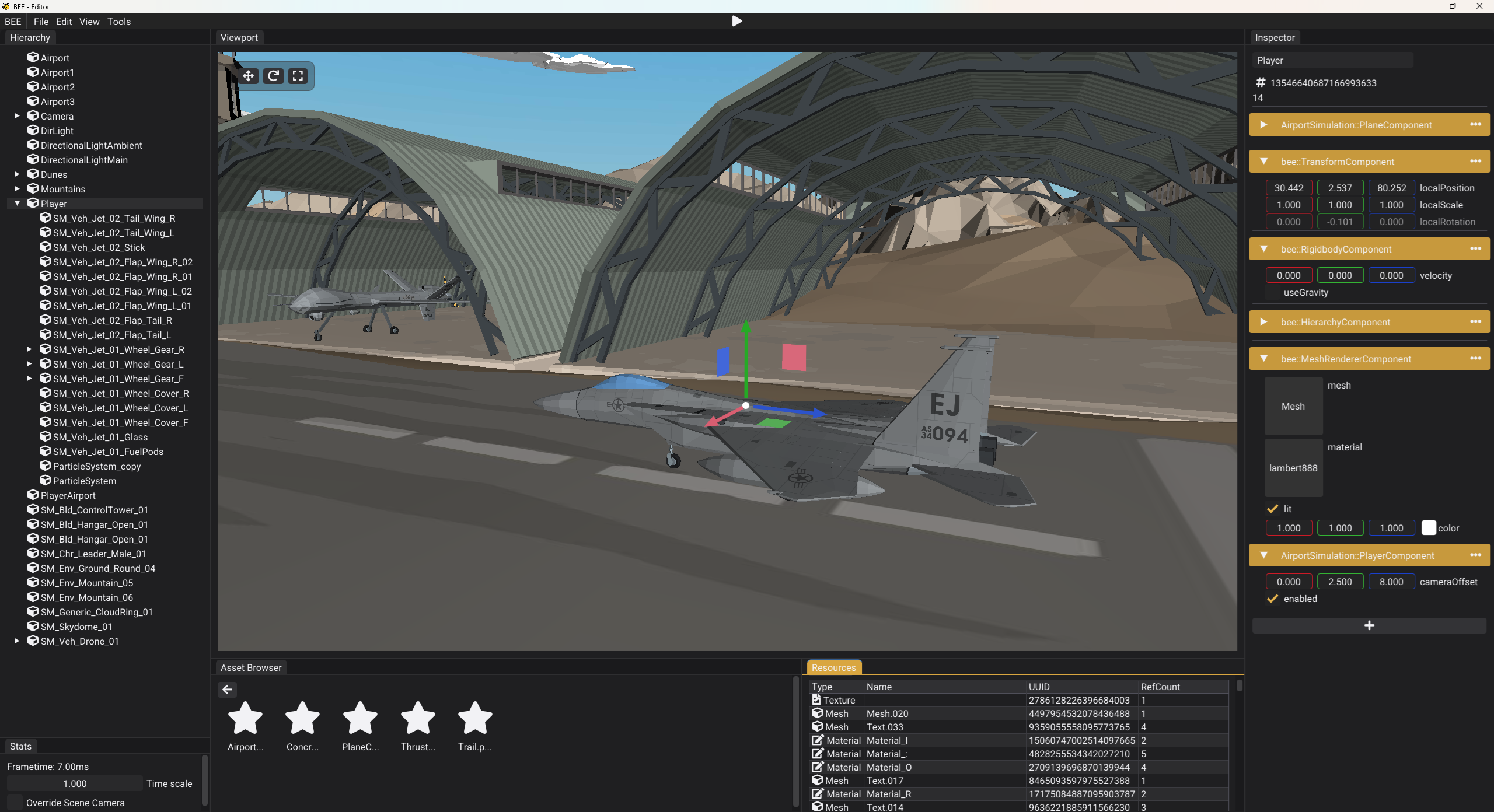
Description
This is a project that I worked on for Block A of my second year at BUas. We were tasked with building a custom game engine that uses ECS, and features: serialization, reflection, level editor, model loading, and others. I will go over some of the most interesting topics and challenges I have faced during the project.
We were given a starting point, which had most of the device abstraction (native window, input, filesystem) implemented. The renderer has also been provided by the university, but required quite some manual integration. I will generally be omitting these features.
The project has been developed under an NDA, which means I won't be able to share any PS5 implementation details.
Engine Architecture
When it came to the engine architecture, we were also given some suggestions in the starting point. I have followed some of them, but I also rewrote quite a lot.

Engine Architecture
The engine is built as a static library and then linked by the game executable. It exposes a clear API for the game to register its own behaviour and run the engine.
There are many engine systems, which each handle a specific feature: rendering, physics, serialization, resources.
Runtime and Editor separation
The runtime (shipping) and editor is implemented in one project, which means the editor is hidden behind an EDITOR macro. Whenever this macro is defined, the Editor class and all editor systems are compiled in.

Build Configurations
This is one of the approaches to do it, and I already have a few remarks about it. I will touch upon this in a different blog post.
Entity Component System
I used EnTT to implement an entity-component-system into my project. The ECS and Scene features I have created supported:
- Game Project Components Registration
- Component Reflection and Serialization
- Scene Snapshots
- Hierarchy
I have created numerous components, each taking care of a specific feature:
MeshRendererComponentTransformComponentHierarchyComponent- ...
Components were purely data structures without any functional logic.
Systems were then used for writing logic that rapidly iterates on a ton of components (preferably of the same type) and performs operations on them: such as rendering.
I have defined a base class for every system to use:
class ISystem
{
public:
    ISystem() = default;
    virtual ~ISystem() = default;

    virtual void Start();

    // Update when no game is running
    virtual void UpdateEditor(float deltaTime);

    virtual void Update(float deltaTime) = 0;
    virtual void Render() = 0;
};
Resource Management and Model Loading
I have implemented a complex Resources system that handles model loading, reference counting and importing. This has been done using .meta files that were generated at import-time. These meta files were then indexed at the startup of the editor, allowing to have an idea of all the resources present in the project. This avoided the use of paths, so whenever I needed to refer to a resource, I simply used its UUID. This heavily simplified moving of resources and also allowed for various editor tools.

Resources Window
I used tinygltf to support model loading. I could load:
- .glTF files with external textures
- .glTF files with embedded textures
- .glb files
I read all the materials in the glTF file and I also propagate the hierarchy.
Hierarchy propagated from glTF nodes
Reflection and Serialization
I implemented a robust reflection system that utilized visit_struct to offer compile-time reflection. I was able to iterate through members of structs, which made serialization and inspector rendering fully automatic. This was a complicated feature to implement, but turned out to save a ton of time.
It required minimal work to define what should be reflected. Thanks to contexts, I was able to create special cases for reflection. I also created a metadata system above the reflection, which allowed to customize how individual members are rendered in the inspector.
// Only serialize m_parent
VISITABLE_STRUCT(bee::HierarchyComponent, m_parent);

// Render m_parent, m_depth, m_children
VISITABLE_STRUCT_IN_CONTEXT(bee::InspectorContext, bee::HierarchyComponent, m_parent, m_depth, m_children);

// Make m_depth readonly in inspector
META_MEMBER(bee::HierarchyComponent, "m_depth", bee::Metadata::Readonly);

// Or...

// Hide the whole component in inspector
META_TYPE(bee::UUIDComponent, bee::Metadata::HideInInspector);
Serialization then essentially meant going through all of the members of a type and serializing it based on its type using nlohmann::json. Thanks to this, I was able to serialize scene files that described the state of every entity.
{
    "Entities": [
        {
            "Entity": 7357142310650514377,
            "bee::CameraComponent": {
                "m_farClippingPlane": 1000.0,
                "m_fov": 80.0,
                "m_nearClippingPlane": 0.10000000149011612,
                "m_viewType": "Perspective"
            },
            "bee::HierarchyComponent": {
                "m_parent": 0
            },
            "bee::NameComponent": {
                "name": "Camera"
            },
            "bee::TransformComponent": {
                "localPosition": [
                    0.0,
                    60.0,
                    0.0
                ],
                "localRotation": [
                    -1.5707963705062866,
                    -0.0,
                    0.0
                ],
                "localScale": [
                    1.0,
                    1.0,
                    1.0
                ]
            },
            "bee::UUIDComponent": {
                "uuid": 7357142310650514377
            }
        }
    ],
    "FormatVersion": 1,
    "Scene": "SceneName"
}
Editor
I created an editor that supported complete level creation thanks to multiple editor systems.
Viewport
Viewport rendered the free-fly editor camera which allowed to look into how the scene looks. I have also implemented gizmos that were used for moving selected objects.
Hierarchy
Hierarchy was used to see all of the entities and select them. It also showed the hierarchical relations and allowed for parenting and re-parenting.
Inspector
Inspector allowed to inspect the selected entity. It showed all of the components and allowed the user to change them. My inspector solution was fully reflection-based.
Asset Browser
Thanks to the ResourceIndex system, I was able to show all of the indexed resources in the asset browser and allowed the user to drag and drop them from there into reference fields in components. This also updated realtime with newly imported resources.
Cross-platform
The engine ran on PC and PS5. This required quite some platform abstractions and I made use of unified interfaces with platform-specific implementations when needed.
The editor was only implemented for PC, but most of the editor system worked on the PS5.
Shipping a game
A substantial part of this project was shipping a game created in this engine. I decided to create a small plane fighting demo.
Wingstrike: A demo game created in my engine
Writing gameplay code
The game was written in C++, which required the engine to have a clear API that allows to register custom components and systems. This was quite a challenge, but it ended up working very well.
// game.cpp

// Game system registration
auto& ecs = bee::Engine.ECS();
ecs.AddSystem<AirportSimulation::PlaneSystem>();

// Game component registration
bee::ComponentRegistry::RegisterComponent<AirportSimulation::PlaneComponent>();
Calling these two functions integrated the user's code in the core engine loop, while still maintaining the engine and game separation.
I found it quite annoying to write gameplay code in C++, because of slow iteration times due to recompiles and very limited reflection. This is when I got interested in engine scripting.
Engine packaging
Having the requirement of shipping a game, I needed to implement project packaging into the engine. Because of the macro architecture, this got a bit complicated, but turned out to work like this:
- Popup a folder select for the output directory
- Start a MSBuild of the engine without the
EDITORmacro defined. - Copy the built engine binary into the output folder.
- Copy the assets folder into the output folder.
- Dump the ResourceIndex into a
resource_index.dumpfile to prevent filesystem scanning in exported builds.
This is an example of the resource_index.dump file.
[
    "[Assets]models/mountain_01.glb.meta",
    "[Assets]models/clouds.glb.meta",
    "[Assets]models/cargoplane.glb.meta",
    "[Assets]models/hangar_closed.glb.meta",
    "[Assets]models/drone.glb.meta",
    "[Assets]models/Dunes.glb.meta",
    "[Assets]particles/PlaneCrash.particle_profile.meta",
]
Next time I implement something like this, I would like to work on not shipping the full assets folder, but making that in a binary. The solution I currently implemented, anyone can change how the textures look or what the particles do.
Conclusion
It was a huge learning experience developing this game engine. I thoroughly enjoyed this process and it got me very interested in game engine programming. However, I did do a lot of mistakes and I cannot wait to work on my next game engine project to fix these and take different approaches.

This project has been created at BUas