Zap Engine Postmortem
A quick look back at the development of Zap Engine, our custom C++ game engine.
Introduction
I want to go back and reflect on what has been about 5 months of university work on a custom C++ game engine called
Zap Engine. I will talk about my personal experience with working in a team of programmers, later getting joined by
designers and artists, and the development challenges we faced along the way1 1. I will be mostly reminiscing about some fun stories and stressful moments. For more technical info, visit the Zap project page.
To kick it off, I quickly want to summarize the structure of this university project. For the first eight weeks, the creative brief was to create a cross-platform (PC & PS5) game engine in C++ that targets a specific game genre, in our case: a space shooter. For the next eight weeks, the brief was to create a game in this engine. In other words:
- Block C: 03/02/2026 - 02/04/2026, 8 weeks of work, 7 people (only programmers) - engine work and two small demos
- Block D: 13/04/2026 - 12/06/2026, 8 weeks of work, 17 people (+3 programmers, +5 designers, +2 artists) - some engine work, mostly game work
I was part of the core engine team, which started with the engine in block C, so I spent about 16 weeks on the engine. However, it is fair to mention that a lot of my focus switched to the game on block D, so I have not done as much engine work as I would have liked to. I will get back to this later.
The beginnings
When we were introduced to the teams at the beginning of block C, we found ourselves with a team of six engine programmers and a single graphics programmer. This was less balanced than we would have hoped for, but we had to roll with it.
Starting point
We had an option to start with a template from the teachers, but since we already had an idea of how we would like to build the engine, we decided to start completely from scratch. This was a courageous decision, but I never regretted it.
Our scripting-first design philosophy was so different, that we would have ended up rewriting most of the template code either way. We did reuse some code from our previous engines, which saved us a ton of time.
First days
I don't remember much from the first days except the pure feeling of being overwhelmed. We had to plan out our first sprint and we had a very hard time giving features a correct priority.
All of the things to be implemented were extremely entangled, which gave us a very hard time parallelizing work. We had people that didn't have anything to work on, since they were blocked by another task that took a little longer to complete.
We were also a mix of people, some of us had never worked together before. It took time to adjust to each other's work style and make sure everything was in line with the engine vision.
One thing I remember from these days: I hoped that these things would smooth out later on (spoiler: they did).
How are we standing?
This was the end of the first sprint, which means February 11, 2026, so around a week of work. This is the video that we put into the presentation for the teachers.
The state of the engine after sprint 1
The mask movement was still driven completely from C++. We had a concept of editor states (editor, play, pause), we had a hierarchy that displayed all of the entities in the scene, a multi-view (♥️) viewport, console and a content browser.
There was not much to show, since we spent a lot of time building the base, but things were looking optimistic and we were picking up steam. 🚂
The engines are starting
I was entering sprint 2 with a clear head. Sprint 1 could have been better, but I was still proud of what we pulled off. However, the job was obviously not finished.
Sprint planning
I remember that the second sprint planning was already miles better. We knew that we screwed up some things in sprint 1 and we started setting proper priorities and relationships between tasks. It was also at this time when we started doing epics, so that we could easily group big features with their specific tasks.
Quick break
We had a week long break here in the Netherlands, so my friend and I (who was also in the same team) went for a week long trip to Scotland. There was no coding done that week (since I did not even bring my laptop), so it allowed me to fully reset before coming back to the project.
I don't have much to share about the project, but we did pay an obligatory visit to the Rockstar North office.
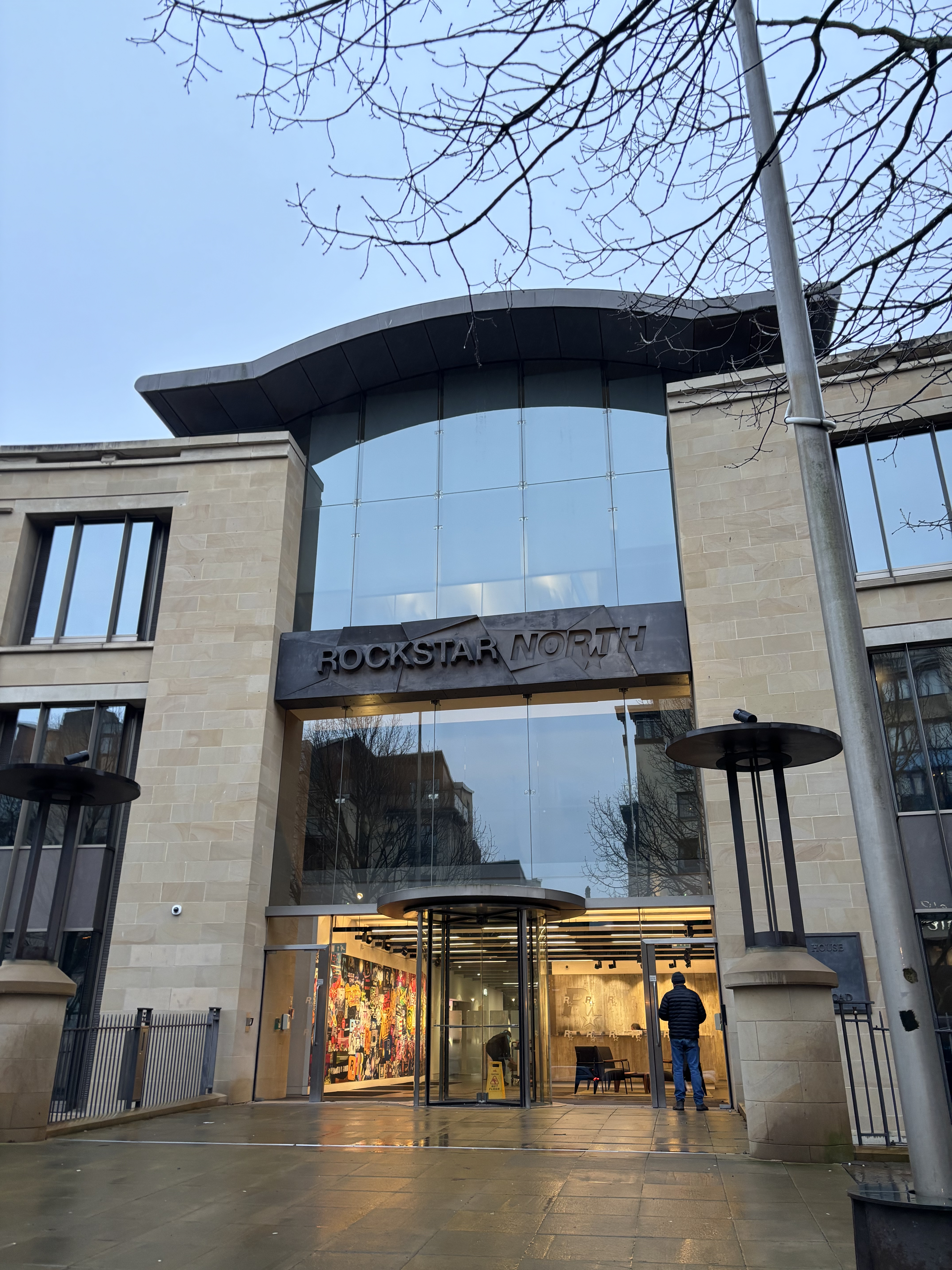
Rockstar North Office in Edinburgh
We also enjoyed a lot of nature, which definitely lowered the levels of my cortisol.
The peak of Arthur's Seat
Calton Hill, overseeing Arthur's Seat
It was a great trip, but it was time to come back to the project.
It's time to start scripting
In one of the first chapters, I mentioned that our engine was scripting-first. This essentially meant that we would write zero C++ code for our game and it would all be driven from AngelScript. Well, it was week three of the project and AngelScript was in fact not implemented yet.
In block B, I spent eight weeks researching AngelScript and creating a wrapper library Seraph. This was a good base, but I had to port it into this project. On its own, that's pretty easy, but there was one thing in the way: PS5. When I was working on Seraph in block B, I did not target PS5. I knew AngelScript runs on PS5, but I didn't know how many changes would have to be done in order to make it run there.
The answer was: quite a few. I spent about three days of work trying to make AngelScript & Seraph compile and run on PS5. After fixing a ton of random memory crashes, I was successful 🎉.
I am not gonna lie, I had some tough times where I felt everything crumbling under my hands. Things did not really work at first and I was really lost about what's going wrong. I also felt a huge amount of pressure, since I was the one responsible for making scripting work. It was a core feature that we built our whole engine design around and not having it was simply unimaginable (there would be ways, but it would require us to change a lot).
All in all, I think this was one of the most stressful weeks for me in the entire development of Zap, but it turned out well.
The engine is a bit too quiet
I took care of integrating FMOD into our engine. What I remember is that it was a decently seamless process, but my implementation was a bit barebones. I only supported one-shot events, since we did not have a need for persisting audio handles and stopping sound (just yet). This was my first time working with FMOD and I was impressed by the amount of things you can achieve in FMOD Studio.
I have one fond memory of implementing FMOD: for the pull request that I was opening, I created a quick video to showcase the functionality. It was an audio of Talking Ben saying its famous voice line "Ben".
FMOD Pull Request demo
This got a small code review, I fixed some styling issues, and re-requested review. One of my teammates approved this PR with a message "ben 👍" and merged it.
Turns out my variable renaming fixes did not rename everything and the project failed to compile. Since this was merged upstream, we both got a strike for breaking main. 🐶
Team dynamic
We also made improvements in working as a team. We slowly understood each other's working styles, which allowed us to be more productive as a whole. We had a good velocity of reviewing PRs and shipping code in general.
At this point of the project, I was very proud of the direction we were heading and I had high hopes.
Game time
As mentioned earlier, our brief wasn't only about the engine. We had to develop two game demos alongside it. Since we were nearing end of sprint two, it was about time to stop ignoring this fact. One of our demos was a Starfox-like shooter on rails, which means the player is following a spline and shooting at incoming enemies. The second demo was a Squadrons-like arena shooter, where the player needs to defend a payload ship from enemies trying to destroy it.
We need splines
The goal for us was to create tooling necessary for these games. At this time, I implemented splines into our engine, with a very ad-hoc spline editor. This editor was made in one afternoon and ended up sticking with us till the end of production of Petrified (our block D game).
Spline Editor
It had its issues, but it has been improved over the span of the project. The most important thing was that it allowed us to create content at that time.
I also took care of creating the spline bindings for AngelScript, so that we could actually use it from the game code.
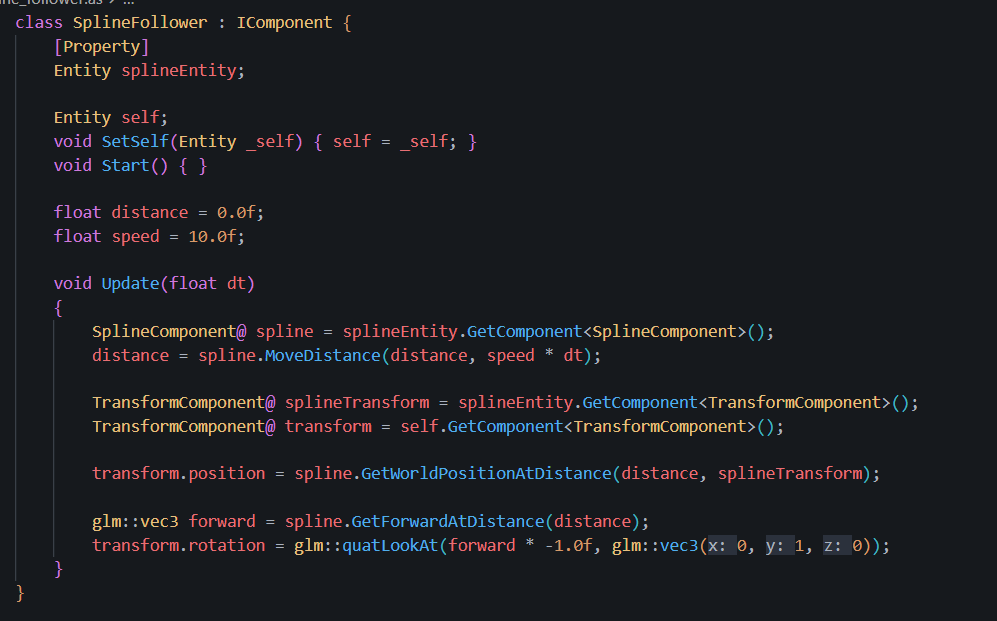
Spline Follower in AngelScript
We need scripting
I have not done much for the sprint 2 demos of our games, since I was very busy with implementing scripting. Luckily, we had people in the team who picked up the game work and they have done a fantastic job.
What are we at?
End of sprint two came by and we had to show two game demos and also some progress on the engine. This is what we had.
Starfox Demo
Squadrons Demo
The Starfox demo showed that we have splines and timeline-based animations in the engine. It also showed a planar-movement controller written completely in AngelScript. Other than that, the gameplay was pretty much non-existent.
The Squadrons demo had a bit more: we had physics and could detect collisions between objects. You could shoot bullets (read: very scaled down SciFi helmets) and destroy yet another SciFi helmet. As you might be able to tell, our model importing pipeline wasn't quite there yet.
Halfway there
Starting sprint 3 marked an important milestone: we were halfway in the project. I feel like this is the tipping point in every project, where the nerves start working a bit and you slowly near up the final stretch.
This sprint was the point where the plan was to divert a lot of our attention to the game demos. We had enough tech to move two or three (I don't remember) people to "full-time" on the game. One note to be said: this was planned for mid-sprint 2, but things did not work out. 🥲
Work on the game needs faster iteration
To work fast on the game, not having to restart the engine to see the script changes would be helpful. Luckily, this is achievable and decently easy thanks to scripting. I've done this in the last block, so I knew which direction to go. However, I did learn from last time and implemented it way simpler this time.
Script Hot Reloading
I remember solving one issue with script hot-reloading: what should I do when the user starts the engine with broken scripts? The hot-reloading system relies on serialization, which doesn't work when the scripting system is not initialized. The solution might be a bit underwhelming: I gave up.
I ended up not applying patch solutions like rolling-back to the scene serialized state, because I was scared that it would only introduce issues in the long run. I simply show a popup saying: "Your scripts are not compiling, fix the issues and restart the engine.". By the way, this turned out to be a very good decision.
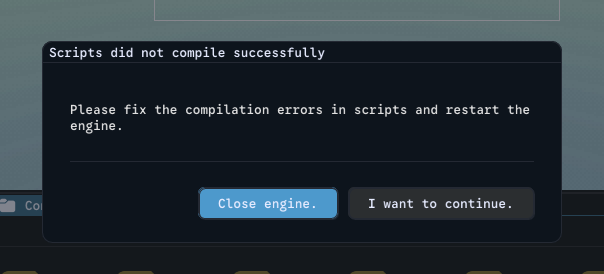
Failed compilation popup
Splines need to interact with gameplay
One of the other features I implemented was a concept called spline markers. It's essentially events at a certain distance, I just enjoy calling things more than they are. 😅
This allowed us to bind game events to locations on the spline. We could mark where enemies enter or where an object falls on the player. This was the main level design tool in the Starfox demo. I made script bindings for this feature, so that it would actually be usable from AngelScript.
array<string>@ markers = spline.EvaluateMarkers(
    lastPlayerDistance,
    controller.currentSplineDistance
);

for (uint i = 0; i < markers.length(); i++) {
    Log::Info(format("Hit {}", markers[i]));
}
Work on the Squadrons demo
I also did some work on the Squadrons demo. I picked up the targeting feature, which allowed you to flag and highlight enemies. The fun feature was when they got off-screen, there was an arrow pointing in their direction, which "scaled" with how far they are. This was especially fun, since our UI system resembled how things are handled in Unity... and I got nostalgic to my old Unity days. 😢
Enemy Targeting
I also worked on the UI that you can see at the top of the screen. It simply shows the progress of the payload and its health. You can see a video where I fail to defend it and the payload dies.
Payload progress and death
It was also great to work on the game again after a bit and see how much the engine moved in terms of usability. I knew we were not quite there, but we were getting closer every day.
Things are slowing down
At this point in the project, I noticed a big dip in the PR merge velocity and general stability of the project. We needed to ship a lot of things, which meant people (including me, of course) were working on their own features and sometimes forgot to review others' PRs.
This was understandable, but it was something we had to address in the next sprint, so that we could ship a functional engine with all the planned features.
Working on tons of engine features and two demo games at the same time also turned out to be hard for code reviews. The reviewers didn't always have the full context of the feature, and we often let breaking changes slide through. It was hard to track whether this engine change broke something in the two existing demos on any of our platforms. Having integration testing would have been really handy here, but it was sadly out of scope.
One day, I would love to look into spinning up the game on a CI machine, simulating input and checking whether the result is as predicted.2 2. This sounds sweet, but it is a huge task on its own. As an intermediate step, we had a discussion about at least testing if scripts compile, so that we could immediately see if faulty code was pushed in. We never found the space in the sprints to do it though.
Wrapping things up
Entering sprint 4, things got a bit more stressful. We were in the last stretch and we saw all the things that were still left to do. It was also cut a little bit shorter, since we had to focus on our documentation3 3. Documentation means the deliverable for our teachers. We need to keep in mind that this is still a university assignment, so we needed to put time into that too.
In terms of my work, I had one big task on my plate: an undo redo system.
Pressing Ctrl + Z
One of the core features that was missing in our engine was an undo redo system. This is something that we all take for granted, but it is very much not granted, which is also something I learned working on this system. Since our goal was to move with this engine to block D, designers and artists would prefer using an engine that can undo their changes. So I set off on an adventure4 4. While it may sound like I complain a bit too much in this chapter, this was one of my favorite features to work on. I am just pointing out the pitfalls I fell into and what would be better to improve next time.
One thousand different actions
First of all, I needed an easy way to track actions that the user does in our editor. This meant that I had to unify the way we handle editor actions, which was really all over the place.
We had a lot of duplicated code for doing the same actions, such as saving a scene. Keybinds were handled inside of a lot of different files and it was hard to find where things were being called from. I fixed this by creating a zap::editor::action namespace, which was a collection of all of the reusable editor actions. This made the other callsites way cleaner and easier to maintain.
For the future: This is something that needs to be done from the beginning. Anything that you deem could be called again from somewhere else is put into an editor_actions.cpp file. If we did this from the beginning, it would have saved me some time.
Action History
I called the undo redo system ActionHistory5 5. I find it hard to name things well, as you might have already noticed.
I won't go too much into the technical specifics, but this design made it extremely fast. Since I only serialized the components that changed, the undo redo took usually under 1ms. This made the usage seamless and did not impact the user's workflow, which was my goal.
ImGui and state changes
This is where the real "fun" was. The state detection in ImGui is a mixed bag: it utilizes the bool return to indicate state change, which is great for one-off elements. However, this stops working for continuous elements, like a slider. If I took an action snapshot every returned-bool there, you'd have to press Ctrl + Z about 50 times to get back to the original state.
ImGui does expose functions that detect begin/end of continuous interactions, but it needs to be placed right after the element call. It is also called after the value is edited, which meant I had to go back and create a lot of temp values, write into those from the ImGui element and then handle the change action business.
We had a reflection-based inspector, which meant I only had to edit a handful of This is probably what ended up taking the most time. It was very problematic and prone to errors, where one typo could crash the undo call.ImGui calls. We also had about 5 custom inspectors, where I had to go one by one and implement them manually6 6.
I think the same thing applies here: I would be inclined to build a minimal ImGui wrapper next time, so that tracking state changes would be a little less of work.
The PR
The pull request for this was about 1500 lines of code and took a lot of back and forth in review with one of our teammates (thanks for testing this, Hesam 😄). We kept finding new issues where undo redo was not applied, or some random crashes under very obscure repro steps.
At some point, we deemed it functional and decided to test in prod7 7. I know this would not really slide in practice, but we were still a team of 7 programmers, which meant we had a decent amount of endurance when it came to crashes. This was the fastest way to see how it actually performs under an actual workload.
To sum it up
It was a marathon, but it was a very important feature to have. I am glad about the design decision I took, since it was very easy to handle all types of interactions.
At some point, I needed to implement collections of changes because of multiselection. This meant that you could undo or redo multiple actions at once. Extending the ActionHistory to support collections was a matter of 15 minutes.
Content browser
One more thing that I took care of was the content browser for our engine. This allowed you to view all of the known resources and interact with them.
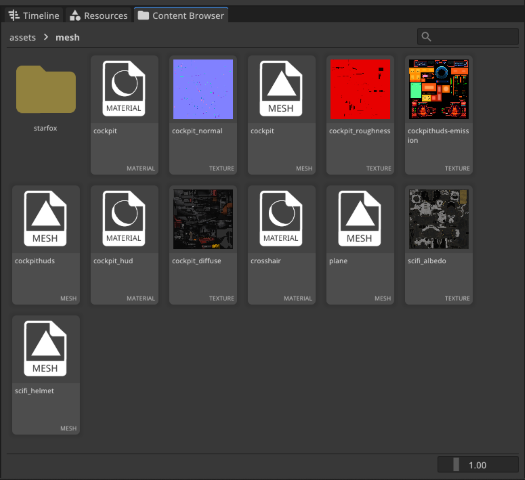
This mainly consisted of creating custom icons in Figma and then doing a bunch of ImGui work to make it look and work somewhat nice. Before this, I created a different version of the content browser, but that one was very functional, this one aimed to look at least a bit nice.
This content browser code stayed with us till the end of block D and it turned out that some of the decisions I made did not scale too well with thousands of files.
This is one of the comments from the content_browser.cpp:
// Note(Seb): This is way easier than dealing with weird desync/refresh issues
// I timed it and it's ~1ms in Release. If we ever get issues, I can revisit this
m_entries.clear();
Well, it was the last sprint and I did not have much time to implement it properly and as the comment says: this solution was way easier than caching.
One of the other problems was that the searching was really slow with a lot of assets. If you'd enter D for example, it would try to show you all of the relevant assets. The textures would try to get displayed, which meant loading the texture into memory at first. This got fixed at some point in block D, but still proved that this code did not scale too well.
We had a brief discussion about how this could be prevented next time. We could set up a "fake repo" of many files and while this could prevent some of them, I still think some issues will always arise.
The picking process
This marked the end of the project for us in block C. We gave a presentation to the teachers with all of the features and it was fairly well received. We finished our documentation and submitted the project. 🎉
Now we were waiting to see whether we would be picked as one of the engines to continue to block D. Personally, this period was very nerve wracking. I was very confident in our technical achievement, but I still knew there were some good engines from other teams as well.
I might have spoiled the surprise by my earlier sentence or the chapters, but: we got through 🥳.
I was very happy that we were selected by the teachers, but it also meant that we had a big responsibility. We would be joined by artists and designers and we would have to actually ship a game by the end of block D. All things said, the job wasn't finished.
The period between
We had about a week of free time before block D started. This was a week to rest up and collect strengths for the marathon that block D will be. That's exactly why I spent the whole week on our engine.8 8. I'm still not sure whether I regret this or not. I did some very needed refactors regarding our scripting engine and implemented some quality of life features for the editor. These things would have to be done either way at some point, so I saved some time in block D. However, I did feel a substantial dip in my energy in the first weeks of block D.
I remember I worked on multiselection and copy pasting of components. This did improve the usability of the engine by quite a lot, but it was also pretty problematic. I ended up fixing some bugs in block D that I overlooked during the implementation.
I also refactored our math AngelScript bindings to completely abstract away GLM and imitate how Unity9 9. If you didn't tell up to this point, I really like how Unity solves various problems in their engine.
With one week gone in the blink of an eye, it was time to start block D.
Going into block D
Before block D, the teams were announced. We got three more programmers, five designers, and two visual artists. As always, the composition could have been better, but we had to roll with it.
I will take this chapter more freeform-ish, as I don't fully remember the sprints.
What are we making?
We were still tasked with creating a game in the genre of our engine, which was an on-rails shooter. The main inspirations there were Ex-Zodiac and Starfox.
Our designers and artists pulled a ton of weight with the concepting and came up with an idea:
In this on-rails shooter you play as a witch riding your broomstick and dodging to stay alive while slinging spells at rock spirits that are trying to turn the world to stone.
Right after the idea was set in stone (sorry), people split into feature teams, and started researching and prototyping. I wasn't really part of a feature team from the beginning, as I was still mainly working on the engine for about two sprints (2 weeks or so).
Setting up the game project
One of the first things that we had to do was to set up the engine binaries and the Zap game project on Perforce, so that it could be pulled by the team and work could be started.
This had one small caveat. We only worked on GitHub before, where read-only files are not really a concept10 10. We kind of expected this in block C, but we actively ignored it and chose to solve it later.
Perforce integration
Starting this, it's been about a year since I used Perforce, so I was a bit rusty myself. Additionally, I never used the P4 CLI11 11. There was also the option to use the P4 API for C++, but it seemed to be really big and would take me a lot of time to set up.
I built a VersionControl class that exposed functions such as Checkout, Add, or GetFileStatus. This allowed me and the rest of the team to easily call these functions to make sure files are in the state we want them to be. I think this was done in one afternoon and then took about a day to finish the full integration. It has been used ever since that and there were not really any big issues with it, which made me glad.
Perforce integration
With this being done, it was time to move on and extinguish other fires. 🚒
17 people using our engine
We kind of expected this too, but when 17 people start bending your engine in completely different ways, things do start breaking. I set up a Sentry integration in block C, so that we could easily track errors and client crashes in block D. The crashes were in fact being tracked, as we collected around 675 crash reports in Sentry. To be honest, I had to mute the email notifications at some point, because it was getting too much into my head.
There were a lot of things that we overlooked in block C and that were now backfiring. I spent a lot of my first few sprints fixing a lot of issues, where I asked myself multiple times: "How did we not get this earlier?". We eventually got into a pretty stable state, but there were still numerous crashes every day.
Looking back, I think it is unavoidable. Software will always crash and malfunction and I think it's also up to the users to create bug reports. Sentry did provide some context, but it was usually not enough for a proper debug session. I did persuade our team to actively create issues in Taiga (our alternative to Jira) for engine problems they encounter, but I should do it even more next time.
Engine release process
Since our engine code was still on GitHub, we needed an easy way to create an engine release and put the binaries into the Perforce depot. I created a Python script that we could run, which would take the built engine project, package it and submit it to Perforce. It was still a bit involved, but it saved a lot of manual labor (which could then turn into human error) by automating a lot of folder copying and stripping. We did around 44 engine releases over the span of eight weeks in block D.
I had the choice of doing a custom Python script or using Jenkins, but I didn't go with the latter for one simple reason. Our university build machines were very busy at that time, which meant an important release could be stuck in a queue for hours. I found this to be not feasible, so I opted for the more manual Python way.12 12. I am so happy with this decision. We had to do multiple hotfix releases and I cannot imagine having to wait in queue to release these.
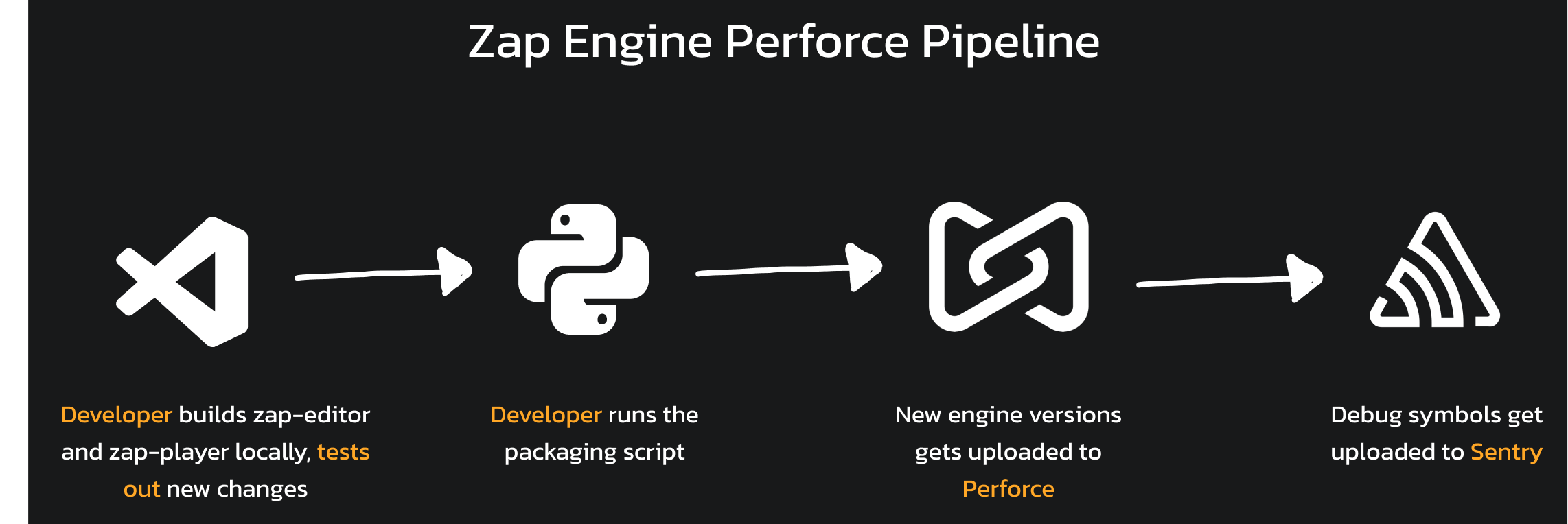
Engine Release Pipeline
All in all, I'm very glad that I did this, since it saved us a ton of hassle. One thing I would try to improve next time would be the amount of steps to make this work on a new PC. It was still an involved setup and not very streamlined, but that's for the next time.
Engine support
I touched on this in earlier chapters, but I want to talk a bit more about what it actually meant to support a full team of people working in our own custom engine.
Documentation
First of all, we heavily underestimated documentation. Some things lived in our "dev docs", but they were not really readable for newcomers, since they required some prior programming knowledge. I tried to combat this by creating a few tutorial videos for general editor usage or AngelScript basics.
This was a good way to onboard people, but they took a lot of time for me and the videos were also way too long. However, I found it really fun to create these videos, so it's a shame that I didn't have any time to make more of them.
I also created more documentation for our physics engine, since there was a lot to take in. We also had other tutorials regarding timelines, UI, data assets or mesh blending, which were written by my teammates.
Scripting reference website
I also tried playing with creating a scripting reference for our engine, but I kinda forgot this existed. The data for it is pulled from Cloudflare R2 and I never got around to creating a step in the engine distribution process, which would actually patch the new bindings in R2. If I remember correctly, most of the engine support for this was ready, but I had one problem that was stopping me from implementing it (which I forgot by now).
Honestly, I think it was a good idea, but it failed on me not giving it enough love to keep it up to date. I don't even know if anybody from the team used it, since I did not give it much advertising.
Game work
I want to talk about some work that I did for the game, Petrified. As mentioned earlier, I was never full-time on the game, because of all of the engine work needed.
Level design tools
I spent a lot of time helping our level designer Duccio by creating tools for him to script sections of the level. I mainly worked on the hazards13 13. Hazards are falling trees, stone shards coming up from the ground, and so on.
This was fun to do, since it was great to see what I could work on to make Duccio's level designing flow as seamless as possible. I find it very satisfying to see people using my tools.
UI
I worked on (almost) all of the UI in Petrified. I think the only UI that was made by someone else was the 3D crosshair and the lock-on crosshairs. The HUD was designed by one of our artists Yara, after which I assembled it in the engine and wired it up in the UIManager. It was a lot of masking for health bars and some vignette work to make things feel more immersive. All in all, it was a ton of fun!
For the main menu, I made most of the elements myself in Figma. I remember that I spent quite some time on this and these were all the iterations.
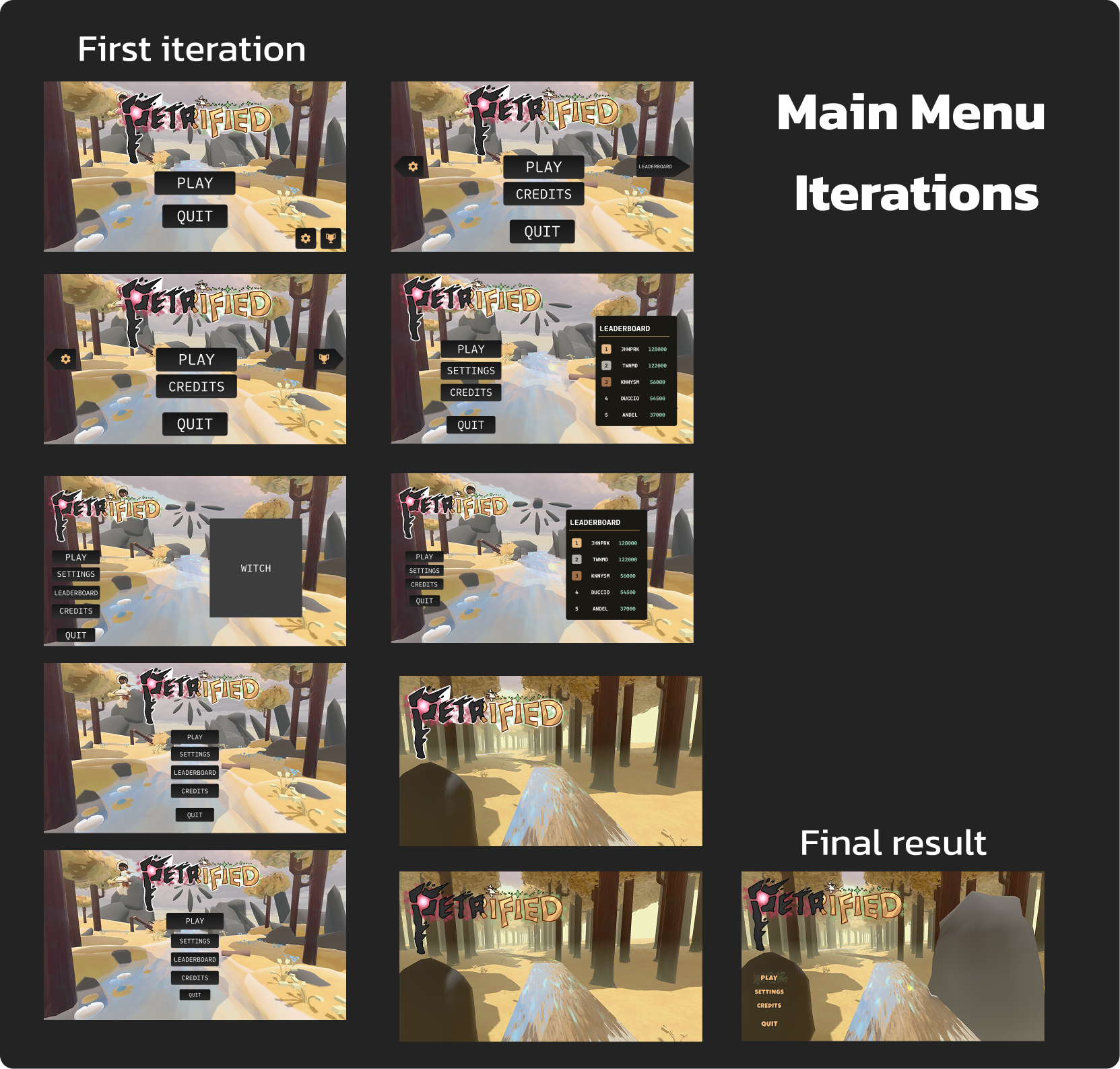
Main Menu Iterations
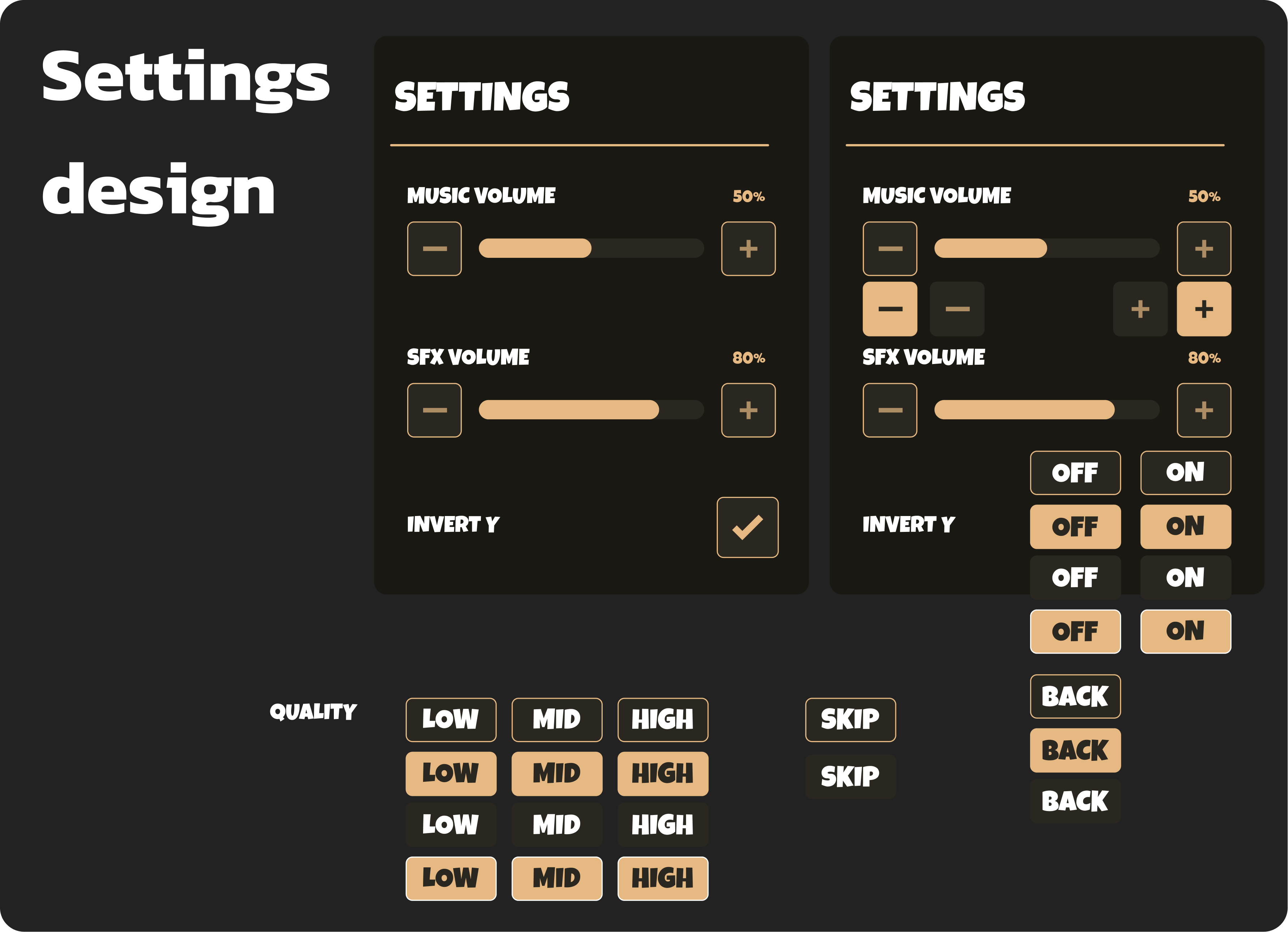
Settings Design
I have done some UI work before back in my Roblox days, and I've also done a fair share of it in Unity. However, it has always been more of assembling it together rather than doing the whole design loop. It was a lot of fun, it took a ton of time and it was a great challenge.
Looking back, I did enjoy the time I spent on UI, despite our editor flow being a bit wacky, where the porting from Figma to engine was a challenge. I did enjoy the whole process and it was great to see it all come together.
Score & leaderboard
I worked on the score feature of our game, which I implemented by following a feature-spec made by one of our designers. The formula itself was not that complicated, but I think it made the game way more engaging.
It was very competitive14 14. Truth be told, I am a very competitive person, which is also a reason why I always gravitated towards games like Counter-Strike or VALORANT. I could not take the defeat, so I spent about 20 minutes playing the game after that and got 56800.
Since I saw the competitive potential of the game, I created an online leaderboard for our game. I used Cloudflare D1 to store the scores and then a small worker script that exposed a simple API for the game to call.
The harder part was integrating this into the engine. I decided to create a LeaderboardService, rather than dealing with a HttpService, which would also possibly need to expose JSON bindings. I first created and shipped a PC version (right before the deadline of the project) and ended up doing the PS5 version of this later before industry day. The PS5 version came with some issues and I was running on a tight deadline there, but it turned out okay.
One thing I remember while doing the PS5 port of this is that the SaveService (a service for saving local data) completely broke on PS5. I did not really follow the approach PS5 takes for saving files, which made me write into some readonly directories. I remember I was solving this a day before the industry day and I was stressed out of my mind. The issue was that SaveService was the backbone of our mechanism for transferring data between scenes, which meant you could not even see the score that you reached after dying.
All things got fixed in time, but it was a marathon.
Marketing
At the end of the project, I also took part in the marketing of our game. I had no expectations going into this and I had no clue what I was doing. I think the only advantage I had was being up-to-date with the latest brainrot trends on Instagram Reels.
Jack and I ended up posting some content on our Instagram and created a trailer for the game. We also did most of the work on our Itch.io page.
I have to say doing the marketing was pretty fun. It was interesting to try out a different part of game development and it was a good switch up. I wish I had more time to do more Reels, but things were still busy near the end of the project. I think I'd like to focus on a bit more marketing content in my next project.
Industry day
To wrap the year up, BUas hosted an industry showcase day, where professionals from the industry came to BUas to check out our games.
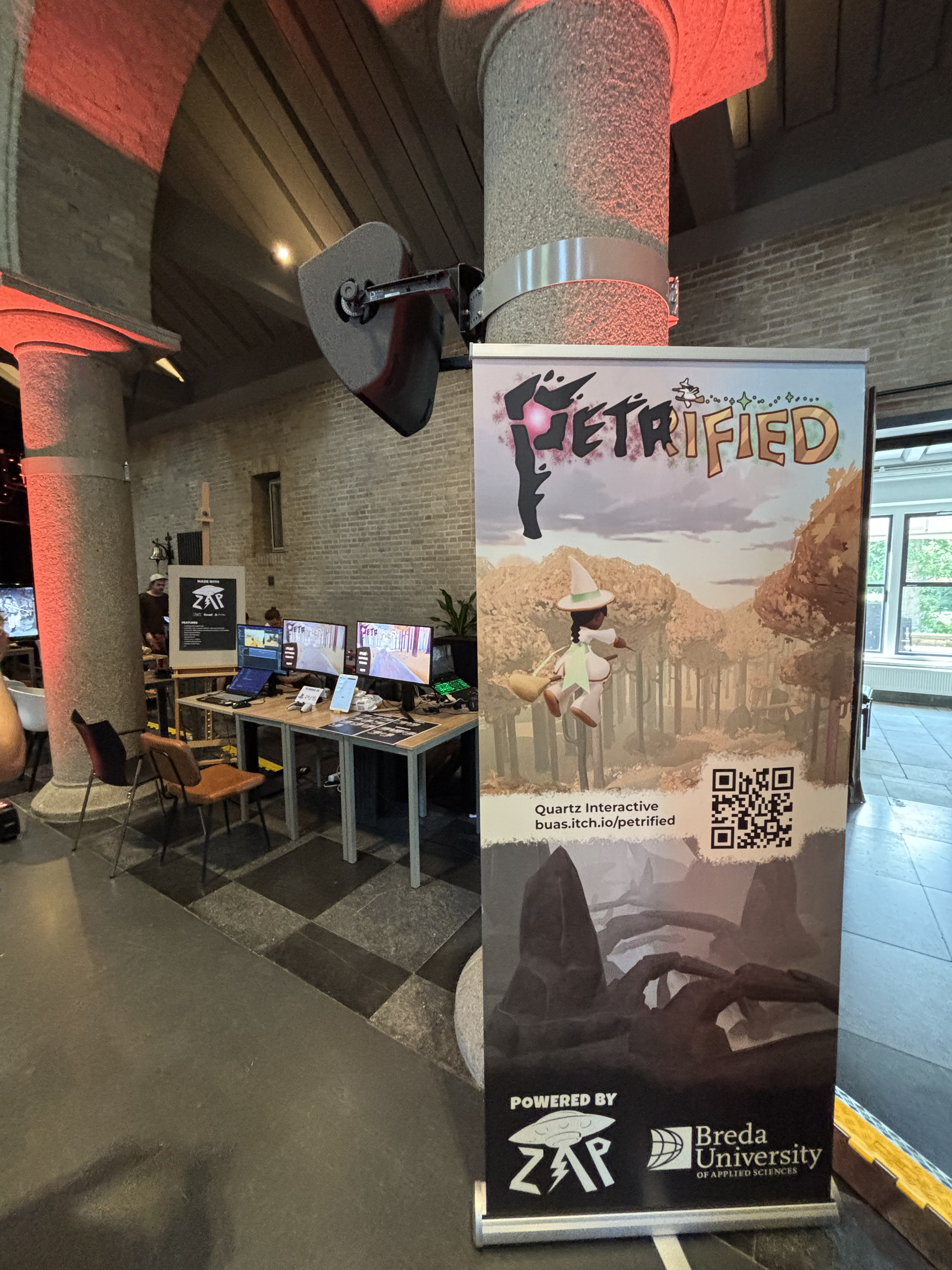
Industry Day Stand
We had the game running on PC and PS5 and then a laptop designated to showcase the engine. It was a ton of fun talking about our game with people from the industry and seeing them be interested in it.
We had a great talk with the Lead Engine Programmer from Larian Studios (thanks Miklas!), where we went through details of our engine and certain technical decisions. We also talked for some time with the co-founder of Guerrilla and ex Epic Games Engine Lead (thanks Arjan!). It was really insightful and motivational to hear their feedback on the engine that we have been building for the last 4 months.
We ended up winning the Y2 Best Tech award, which felt like a great reward for all the hard work we spent on this.
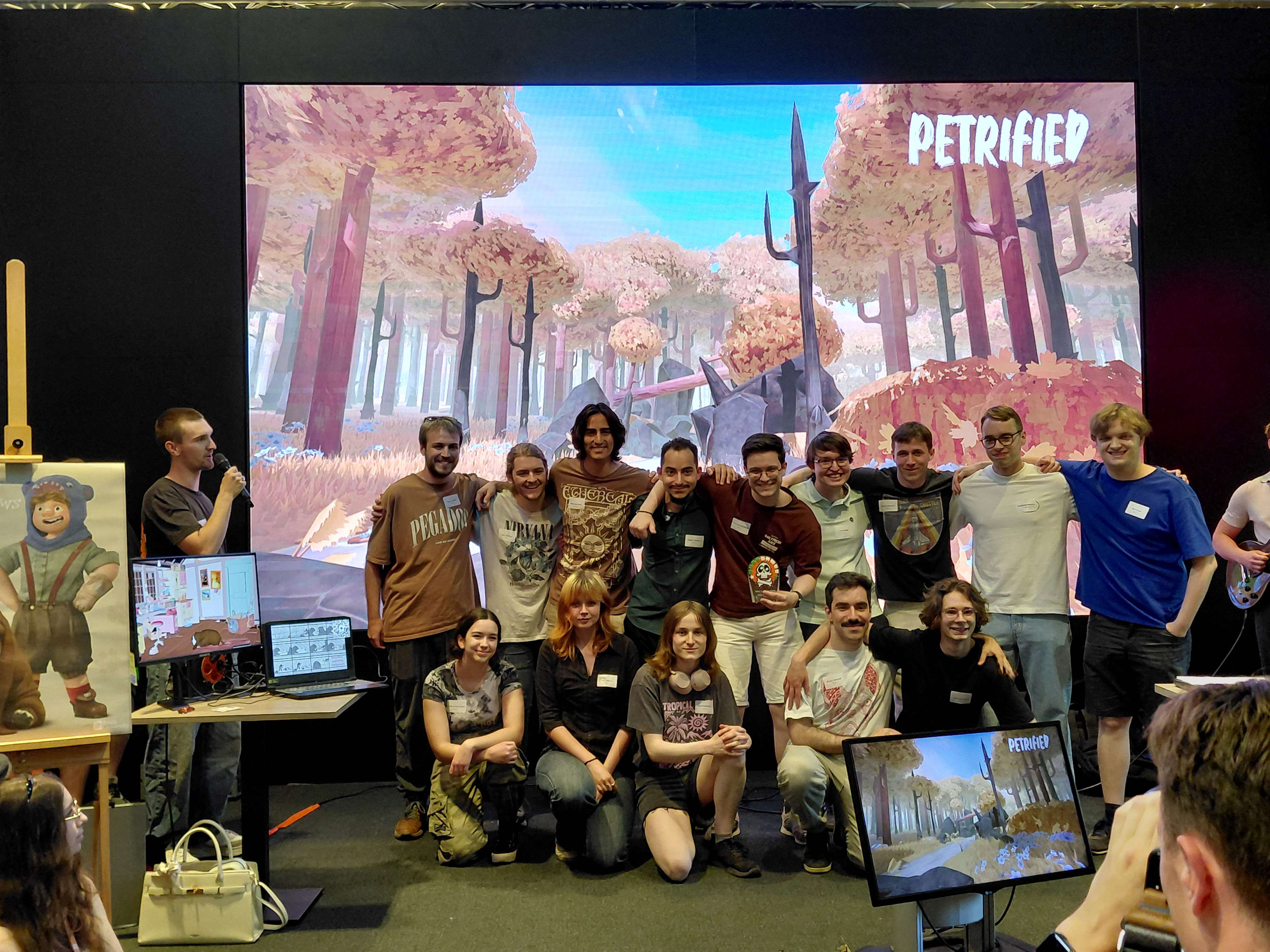
Award Ceremony
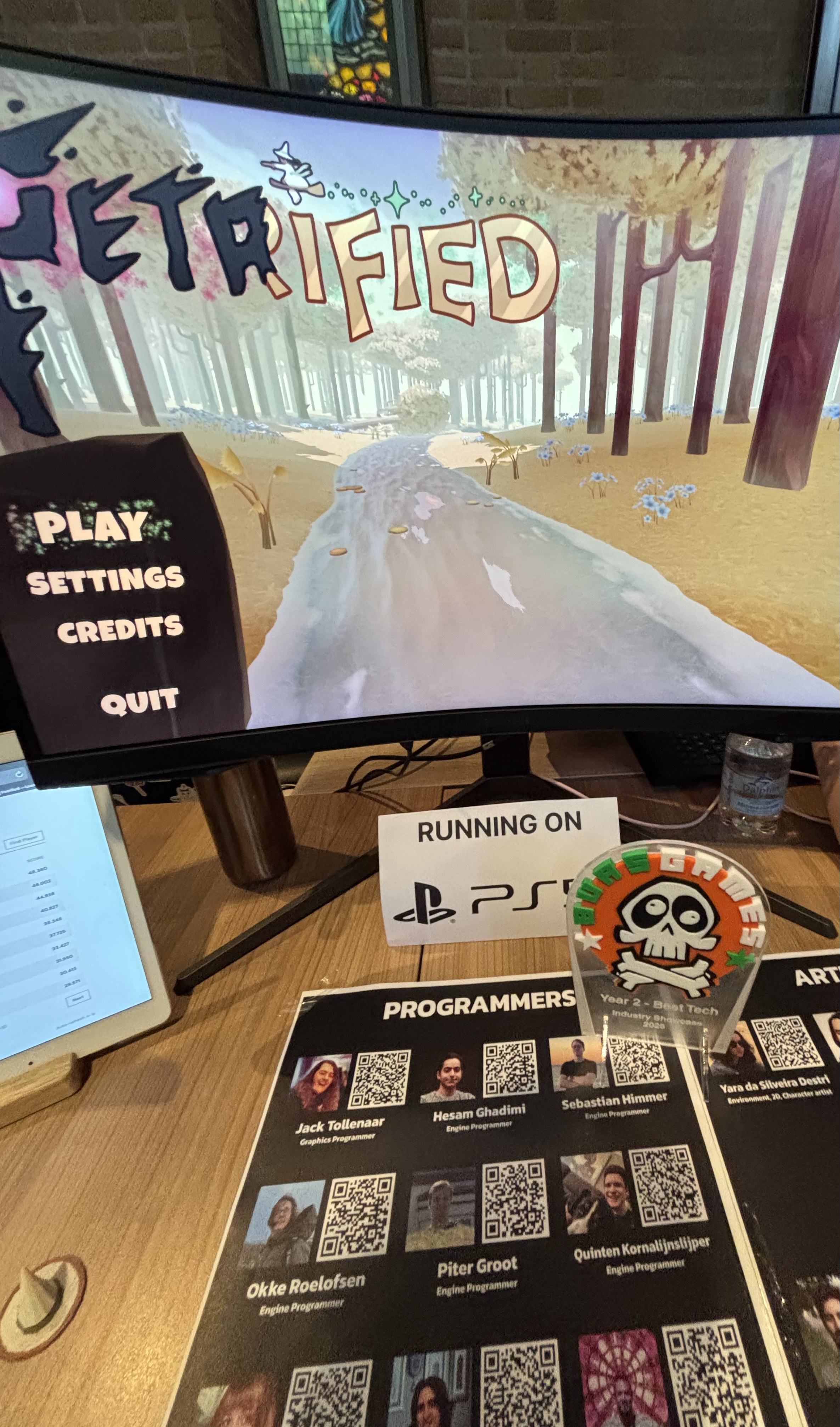
Award
After this, we packed things up and the year was officially over.
Closing remarks
This was pretty much the end of our Zap Engine and Petrified marathon. Looking back, it was a ton of fun. There were ups and downs, but I am really proud of what we pulled off as a team and I think this will be a project that I will be reminiscing about for some time.
For me personally, it was pretty much half of 2026 dedicated to a single project. It taught me how to push on through things, even when they feel impossible to solve16 16. This might sound corny, but I do feel that this project taught me a lot of perseverance.
I'd like to thank Jack, Piter, Miguel, Hesam, Okke and Quinten for pushing in block C and trying their best to build the best engine that we could. And of course, I'd like to thank Ana, Lucy, Balazs, Kenny, Duccio, Marijn, Yara, Boris, Tony, Jorn for joining us in block D and creating such a great game in Zap Engine.
I'd like to also thank you for reading through all of my ramblings and successfully making it to the end. I definitely forgot about a lot of stuff, but I tried my best to recall most of it. I hope to come back to this 10 years in the future and see how I progressed.
See you soon,
Seb
References
I will be mostly reminiscing about some fun stories and stressful moments. For more technical info, visit the Zap project page.
↩This sounds sweet, but it is a huge task on its own. As an intermediate step, we had a discussion about at least testing if scripts compile, so that we could immediately see if faulty code was pushed in. We never found the space in the sprints to do it though.
↩Documentation means the deliverable for our teachers. We need to keep in mind that this is still a university assignment, so we needed to put time into that too.
↩While it may sound like I complain a bit too much in this chapter, this was one of my favorite features to work on. I am just pointing out the pitfalls I fell into and what would be better to improve next time.
↩This is probably what ended up taking the most time. It was very problematic and prone to errors, where one typo could crash the undo call.
↩I know this would not really slide in practice, but we were still a team of 7 programmers, which meant we had a decent amount of endurance when it came to crashes. This was the fastest way to see how it actually performs under an actual workload.
↩I'm still not sure whether I regret this or not. I did some very needed refactors regarding our scripting engine and implemented some quality of life features for the editor. These things would have to be done either way at some point, so I saved some time in block D. However, I did feel a substantial dip in my energy in the first weeks of block D.
↩If you didn't tell up to this point, I really like how Unity solves various problems in their engine.
↩There was also the option to use the P4 API for C++, but it seemed to be really big and would take me a lot of time to set up.
↩I am so happy with this decision. We had to do multiple hotfix releases and I cannot imagine having to wait in queue to release these.
↩Truth be told, I am a very competitive person, which is also a reason why I always gravitated towards games like Counter-Strike or VALORANT.
↩I could not take the defeat, so I spent about 20 minutes playing the game after that and got 56800.
↩